
Claude Code Auto Mode: New Default for Pro, Max, and Team Users
Starting August 14, Auto Mode will become the default permission mode in Claude Code for Pro, Max, and Team users.
Auto Mode checks every tool call with a separate classifier and decides whether the action can be performed without manual confirmation.
One reason why Anthropic trusts Auto Mode more than manual confirmation:
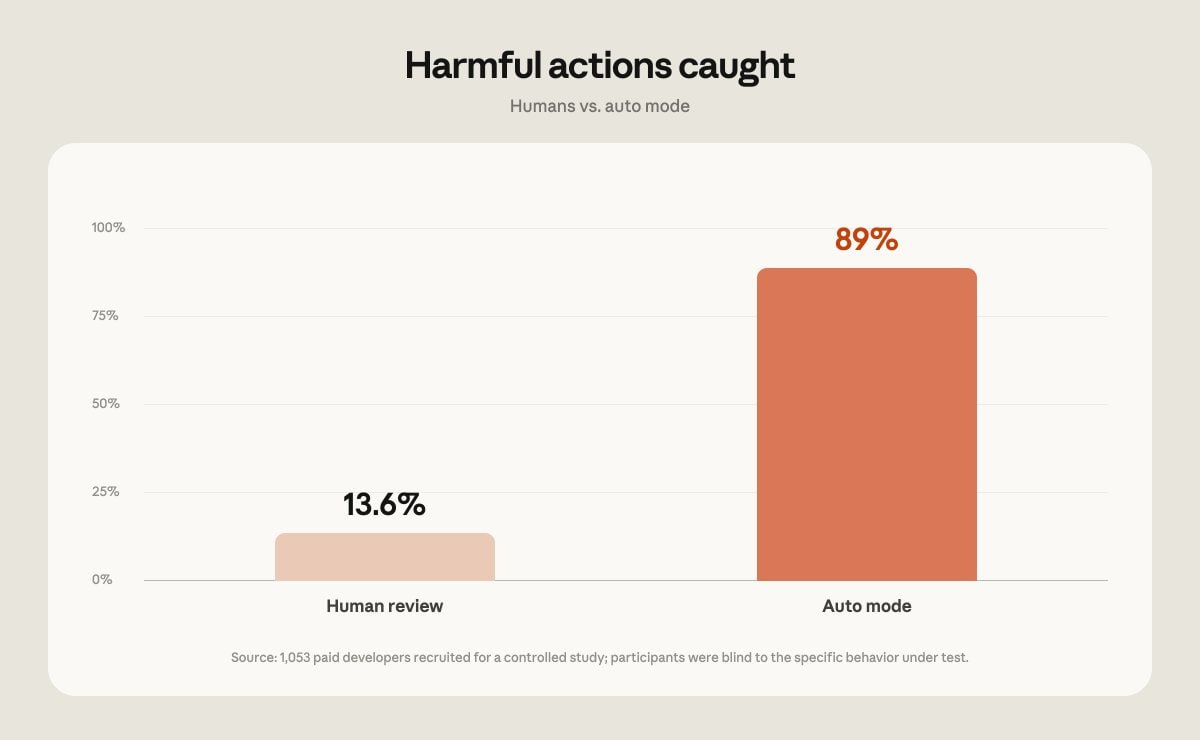
In a study with 1,053 paid testers, a standard permission request was replaced with a deliberately dangerous command. Nothing was actually executed — users only saw the text.
The danger was noticed in only 13.6% of cases, and after 50 requests, this rate dropped to approximately 5%.
Auto Mode blocked those same commands in 89% of cases, and its effectiveness practically did not decrease even in long sessions.
The second reason for the transition is long-running agentic tasks.
Models like Opus 5 can already plan and execute hours of work, but there is little benefit if the agent stops at every tool call and waits for confirmation.
With Auto Mode, you can start one task or several in parallel, and then return to ready-made PRs for review.
The classifier itself consumes a small number of additional tokens, but from today onwards, they will no longer count towards Pro, Max, and Team limits.
Later, this change will also appear for Enterprise and API users, when Auto Mode becomes the default mode for them as well.