dsh‑TUI: Full‑Screen Terminal UI Plugin for DeepSeek Harness
dsh‑TUI adds a full‑screen terminal UI to DeepSeek Harness with streaming output, image/Mermaid preview, session restore, model switching, and easy install.
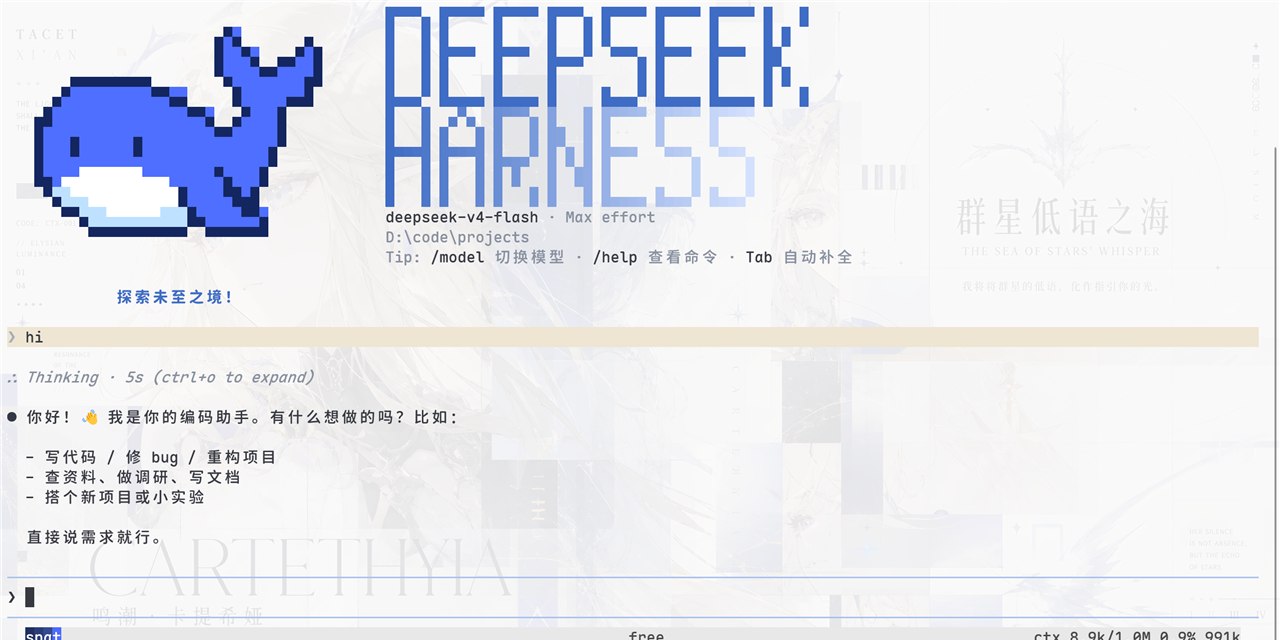
Plugin for DSH, which was personally recommended by the DeepSeek Harness lead Cui Tianyi. Development started during the closed testing phase and has been continuously refined ever since.
dsh‑TUI adds a full‑screen terminal interface in the Claude Code style to DeepSeek Harness:
Streaming output of reasoning, agent status, context‑fill scale, and generation speed. Double‑pressing Esc returns the session to the previous step. It includes image and Mermaid diagram preview, session restoration and export, model switching, and a background task.
Installation with a single command:
npm i -g @deepseek-ai/dsh @deepseek-harness-tui/dsh-tui
After that, run:
dsh-tui

Comments
Weekly digest
The best of vibe coding, AI agents and open source — once a week, no spam.
Related articles
All articlesOh-my-codex: A Workflow Layer That Supercharges Codex Sessions
Oh-my-codex adds a consistent clarification→execution flow, canonical skills, and persistent .omx/ state to make Codex sessions more powerful.
Anthropic launches Claude.dev: Guides, agents & cost insights
Anthropic’s new site Claude.dev offers practical blog posts, guides, agents, and cost analyses for Sonnet 5.5, Opus 5.5, and internal model usage.
X Launches Grok Build: Grok CLI Agent for Terminal Automation
X introduces Grok Build, a terminal-based CLI agent that edits files, runs commands, supports MCP servers, and uses parallel sub-agents to plan and execute tasks.