How to Get Free DeepSeek V4 Access in Claude Code (Bailian & ModelScope)
Step-by-step guide to use DeepSeek V4 for free in Claude Code via Aliyun Bailian or ModelScope, set up CC Switch, and enable 1M context with [1m].
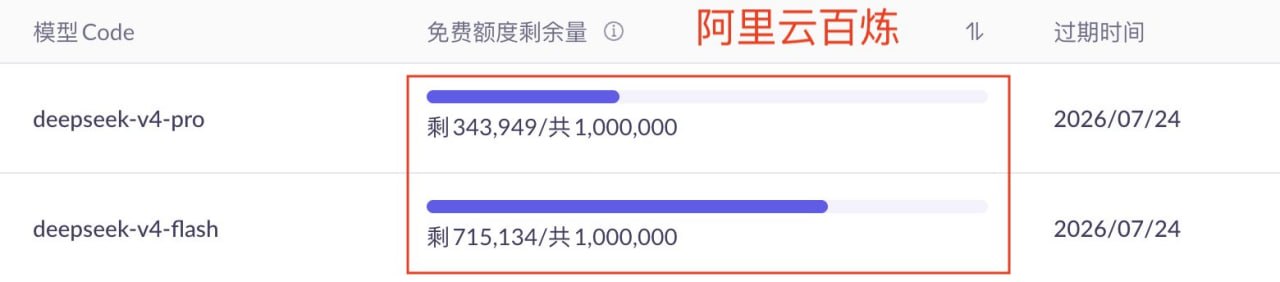


Chon Hyeonwoo from Tokyo shared a guide on free access to DeepSeek V4 in Claude Code:
Step 1: get an API key
You can use Aliyun Bailian or ModelScope — both provide a free quota
Aliyun Bailian (1 million tokens each for V4 flash and pro)
ModelScope (on average 2000 free calls per day, limit — 500 calls per model)
Step 2: download CC Switch and create a provider
— a desktop tool for switching between providers
After installation:
— open the app
— create a new provider
— choose Bailian or ModelScope from the presets
— paste the API key
Step 3: configure the model
Configuration depends on the task. Example:
— main model: V4 flash
— for complex tasks: V4 pro
Nuance: by default, the context is 200K
To enable 1M, you need to add [1m] to the model name
Model name formats :
— Aliyun Bailian:deepseek-v4-flash[1m], deepseek-v4-pro[1m]
— ModelScope:deepseek-ai/DeepSeek-V4-Flash[1m], deepseek-ai/DeepSeek-V4-Pro[1m]
Step 4: save the config and launch Claude Code

Comments
Weekly digest
The best of vibe coding, AI agents and open source — once a week, no spam.
Related articles
All articlesMeanwhile, Claude Code has a new command: /checkup
Meanwhile, Claude Code has a new command: /checkup Run /checkup to: > Clean up unused skills/MCP servers/plugins and free up context. > Remove duplication ...
Claude Code Adds Graceful Stop at 5‑Hour Limit with Reserve Feature
Claude Code now avoids abrupt cuts when the 5‑hour session limit hits, using a small reserve to finish tasks. Rolling out to Pro, Max and Team Premium users.
Generate Lottie Animations from Text Prompts with Skill Piggy Bank
Skill Piggy Bank lets you describe an animation in plain text and generates a ready-to-use Lottie file. Works with Claude Code, Codex, and more. Open source.